 WDC Pos
 Sales Hub
 Product Hub
 Inventory Management
 Whatsapp Marketing
 Marketing Automation
 Browser Notification
 Email Marketing
 Fusion Mail
 SMS Marketing
 Fusion SMS
What Is Marketing Automation? A Practical Guide for Growth Teams
A practical guide to marketing automation, behavior-based triggers, email, WhatsApp, SMS flows, dashboards and campaign reporting.
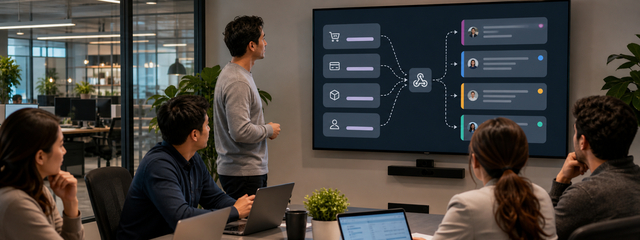
marketing automation helps marketing teams react to real customer behavior without turning every follow-up into a manual task. A customer can join a group, register a phone number, click a banner, open an email, make a purchase, change order status or subscribe to browser notifications. Each event can start the next step in the customer journey.
WDC Marketing Automation is built for these behavior-based scenarios. Teams can trigger email, WhatsApp, SMS, segmentation, Slack notifications and webhooks from the same automation environment, then monitor sends, opens, active scenarios and queue status from a live dashboard.
Marketing automation turns customer behavior into timely action
Teams use automation when manual campaign work starts slowing growth. A customer signs up, joins a segment, clicks a banner, buys a product or stops engaging. Each moment creates a chance to send the next useful message without waiting for someone to notice it in a spreadsheet.
WDC Marketing Automation Force gives marketing teams a practical way to build these flows through behavior-based triggers and multi-channel actions.
Where automation creates the most value
- post-purchase flow: define the customer moment, then choose the message and channel that fit that moment.
- post-signup journey: define the customer moment, then choose the message and channel that fit that moment.
- abandoned cart reminder: define the customer moment, then choose the message and channel that fit that moment.
- re-engagement campaign: define the customer moment, then choose the message and channel that fit that moment.
- order status notification: define the customer moment, then choose the message and channel that fit that moment.
- banner click follow-up: define the customer moment, then choose the message and channel that fit that moment.
- email open or click trigger: define the customer moment, then choose the message and channel that fit that moment.
- browser notification subscription: define the customer moment, then choose the message and channel that fit that moment.
The strongest automation programs start with the customer journey, not the tool menu. Map the points where customers already show intent: signup, first purchase, product interest, cart abandonment, email engagement, browser notification subscription and order status changes. These moments give the automation a reason to exist.
Once the moment is clear, decide what the customer needs next. Some moments need reassurance, such as an order update after purchase. Some moments need a reminder, such as an abandoned cart. Some moments need routing, such as a Slack notification to the internal team. Good automation feels like the business paying attention.
Triggers and actions to combine
| Trigger | Possible action | Business reason |
|---|---|---|
| Contact added to a group | Send welcome email or WhatsApp | Start onboarding while intent is fresh |
| Banner clicked | Add to segment or send follow-up | Use site interest as a signal |
| New sale arrives | Send post-purchase message | Confirm the purchase and prepare the next step |
| Order status changes | Send SMS or WhatsApp update | Reduce support questions |
| Email opened or clicked | Trigger another automation | Continue the journey from engagement |
| Browser notification subscription | Add to segment | Prepare future permission-based communication |
Multi-channel automation without channel chaos
Email, WhatsApp and SMS do different jobs. Email works well for detail and nurturing. WhatsApp can feel direct and conversational when the message is useful. SMS works for short, time-sensitive updates. A team should not send all three by default. It should choose the channel based on urgency, permission and customer expectation.
WDC Marketing Automation supports multi-channel actions after a trigger fires. That gives teams one place to design the logic while still respecting the role of each channel. A new sale might start with an email receipt, an order status change might use WhatsApp, and an urgent pickup reminder might use SMS. The workflow stays connected even when the channel changes.

Segmentation makes automation more precise
Automation becomes stronger when segment membership changes from a static list into a living signal. If a customer clicks a banner, opens an email or completes a purchase, the system can add that person to a segment. Future messages can then respond to observed behavior instead of a broad guess.
This matters for both customer experience and performance. A shopper who clicked a category banner should not receive the same follow-up as someone who just completed an order. A customer who stopped engaging needs a different message from someone who opened the last three campaigns. Behavior-based segmentation helps teams send fewer irrelevant messages.
Dashboard signals to watch every day
A live dashboard keeps automation from becoming invisible. WDC Marketing Automation shows today's numbers, active automations, queue status, sent email automation volume and opened email automation activity. Teams can also watch hourly send and open patterns, recent automation emails and the last 15 days of send/open performance.
These views help marketing managers catch problems while they still matter. If the processing queue grows, delivery may need attention. If sends are running but opens fall, the subject line, timing or audience may need review. If a scenario sends more than expected, the trigger logic may be too broad.
Reporting should guide the next edit
Detailed reporting should show who received a message, who did not, how many messages were sent each day and which contacts appeared in each automation. That level of detail helps teams improve the scenario instead of arguing from guesses.
Use reports to make one change at a time. Adjust the trigger, audience, message, channel or timing, then compare the next period. When every change happens at once, the team cannot tell what improved performance. A clean reporting habit turns automation into a learning system.
No-code does not mean no process
No-code automation gives campaign teams more control, but the team still needs governance. Name each scenario clearly. Document the trigger and action. Assign an owner. Check whether another automation already contacts the same audience. Pause expired campaigns instead of letting old logic keep running.
WDC Marketing Automation lets teams list, activate, pause and edit running scenarios from one place. That matters as the program grows. The first few flows may be easy to remember, but a mature lifecycle program needs a clean operating habit so messages do not overlap or drift away from the original goal.
Internal alerts and webhooks
Not every automation should send a customer message. Some events should alert the business. A high-value customer action can post to Slack. A form event can call a webhook. A behavior signal can move into another system for sales, support or operations follow-up.
This is where marketing automation becomes part of business operations. The same customer event can update a segment, notify a team and start a customer-facing message. The value comes from connecting the action to the team that can use it.
Common mistakes to avoid
The most common automation mistake is building too many flows before the first ones prove their value. Start with one journey that has a clear trigger, a clear audience and a clear result. A post-signup flow, abandoned cart reminder or order status update is easier to measure than a large journey with ten branches.
Another mistake is treating automation as a way to send more messages. The real goal is to send better-timed messages. A customer who clicked a banner needs a different follow-up from a customer who opened an email. A customer who just bought needs a different message from a customer who has gone quiet. The trigger should explain why the message is being sent.
Teams also need to review automations after launch. Check the queue, delivery, opens, segment changes and contact-level results. If a scenario no longer has an owner, pause it. Old automation logic can keep contacting customers long after the campaign team has moved on.
Ownership and message discipline
Every automation needs an owner who can answer three questions: why does this trigger exist, which customer receives the message and when should the scenario stop? Without that ownership, useful flows can turn into background noise. A campaign specialist may launch the first version, but marketing operations should keep the map of active journeys clean.
Message discipline matters most when several channels run together. A customer should not receive an email, WhatsApp message and SMS for the same moment unless the business has a clear reason. Decide which channel carries the main message, which channel supports urgency and which channel should stay quiet. That decision protects trust and makes reporting easier to read.
Pre-launch checks
Before launch, read the flow as if you were the customer. Check the trigger, delay, channel, message promise, segment change and exit condition. Then check the same flow as the operator: who sees failures, who owns edits and which dashboard signal proves the scenario is running correctly?

Implementation checklist
- Choose one customer journey before building many flows.
- Write the trigger in plain language.
- Choose one primary channel for each moment.
- Add segmentation only when it changes the next message.
- Set a reporting review rhythm.
- Pause automations that no longer have an owner.
FAQ
What is WDC Marketing Automation?
WDC Marketing Automation is a behavior-based platform that helps teams send emails, WhatsApp messages, SMS messages and other actions automatically from real customer events.
Which triggers are supported?
Supported triggers include group membership, phone registration, banner click, new product, email sent/opened/clicked, new sale, order status change, another automation and browser notification subscription.
Which actions can be automated?
Teams can send email, WhatsApp and SMS, add contacts to segments, post Slack notifications and trigger webhooks.
Does the platform include reports?
Yes. Teams can track delivery, non-delivery, daily counts and contact-level automation results.